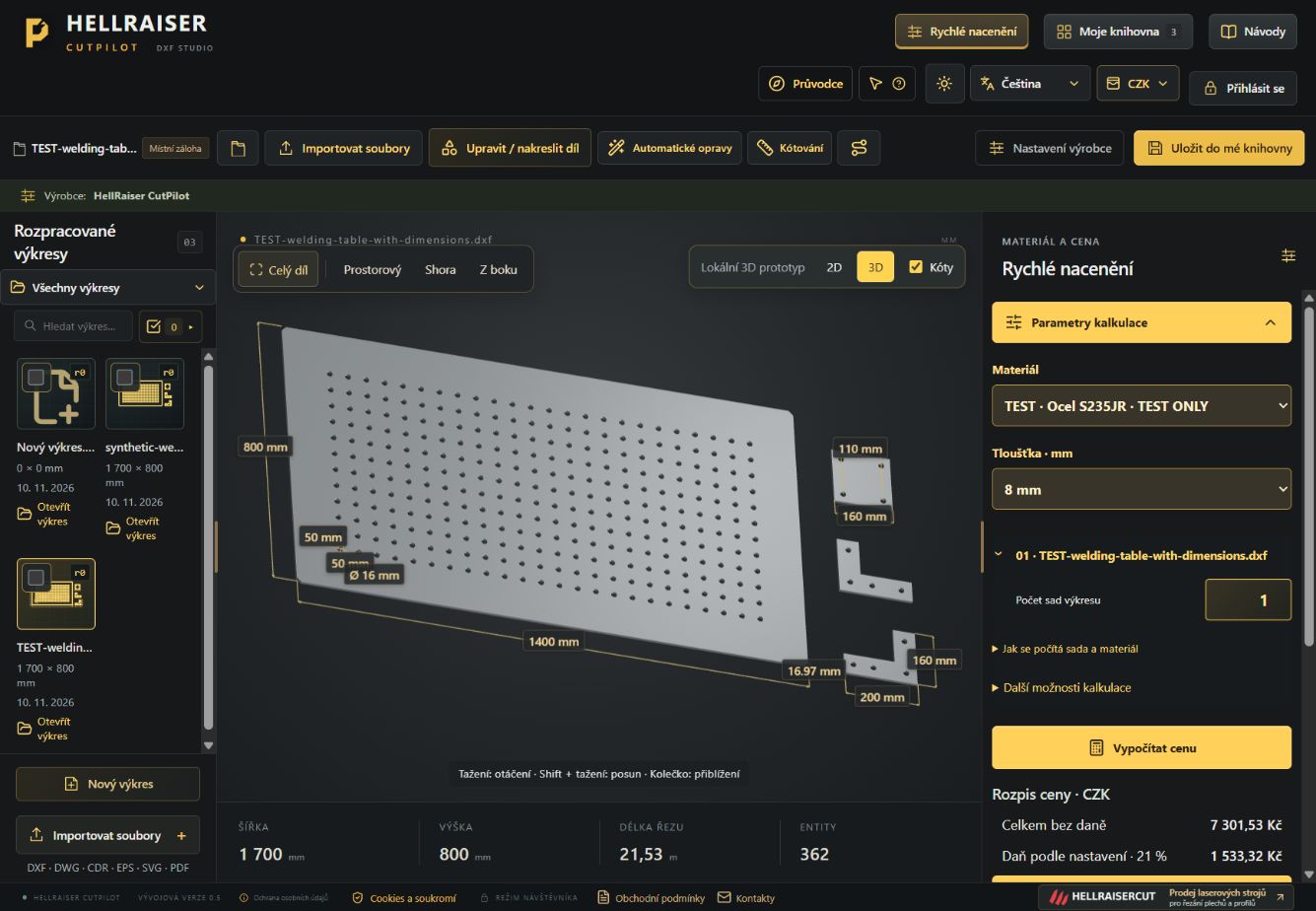
A drawing ready for the next step
Create your own geometry or import a DXF file. Edit outlines, dimensions and drawing details before costing.
HELLRAISER CUTPILOT
Prepare drawings for laser cutting and calculate their cost in one place. Edit your drawing, choose the material and create a clear estimate using your own rates.
HOW PRICING WORKS
Change the cutting length, number of pierces or material to see how the example price changes.
EXAMPLE CALCULATION
Steel
Excludes material and VAT.
An illustrative example using sample rates. Actual estimates in CutPilot also account for geometry, thickness, the machine and the manufacturer's settings.
DRAWINGS AND COST ESTIMATES
Prepare the geometry and calculate the price in the same workspace. Keep your drawings, rates and final quotation within reach.
Create your own geometry or import a DXF file. Edit outlines, dimensions and drawing details before costing.
Save drawings and their revisions in a private library. Keep the original drawing alongside later edits.
Enter the manufacturer's materials, thicknesses, machines and pricing parameters. Estimates use your data.
PDF estimates and a net weight overview. The customer document keeps the quotation separate from your internal cost data.
HOW IT WORKS
Use CutPilot in your own workshop or to prepare customer quotations. The interface is available in Czech, Slovak, English, Polish, German and French.
Import a DXF file or start drawing. Check the geometry, units and dimensions.
Select an available material, thickness and quantity. The manufacturer uses their own rates.
Review the result and prepare a PDF. The saved drawing lets you return to the quotation later.
We are gradually extending CutPilot with stock management and planning. These new features are still being tested before their public release.
Planned material and reservation records linked to specific production jobs.
Track progress from enquiry to order, with a record of changes and supporting documents.
Production planning and a planned Google Calendar connection for keeping track of production dates.
FORMVICO FOR MANUFACTURERS
Do you offer laser cutting, make gates or take on custom manufacturing jobs? Formvico helps you advertise on Facebook and Instagram and reply to people interested in your work.
Manage campaigns, forms and the enquiries they bring in. Follow up by email with the information your customer needs to discuss the next steps.
BEFORE YOU START
Yes. The Open CutPilot button takes you to the current public app. Stock management, planning and the other extensions described above are part of an upcoming update.
No. They are sample values used to explain the calculation. Cutting prices depend on the manufacturer's settings. The software licence is priced separately; check the current terms in the app or write to us.
CutPilot helps with drawings and cost estimates. A geometry export is not a finished NC program, and an estimate does not replace technical approval for production.
Open the app using the button above and sign in with your usual account. It takes you to the same CutPilot you already use.
TRY IT WITH YOUR OWN DRAWING
Take a look at CutPilot. Write to us if you would like to discuss using it in your workshop or learn about the upcoming update.